CoinCatch's Partner Management System (PMS) is the professional tool that capitalizes on this influence. Whether you are a KOL with a follower base, a community leader, or an institutional partner looking to expand your business footprint, PMS provides a transparent, efficient, and high-potential all-in-one earnings and management platform. This article aims to provide an in-depth explanation of PMS's operational mechanisms, particularly its core multi-level commission system, to help you build and manage your own earnings network.
Part 1: Your Personal Business Command Center
The design philosophy of CoinCatch PMS is to serve as a partner's "all-in-one business backend." It offers a seamless access experience via web and mobile apps, allowing you to manage your business anytime, anywhere. The system's core value is reflected in the following aspects:
-
Comprehensive Real-Time Dashboard: The system homepage integrates all key data, including real-time registered user count, trading volume, commission earnings, and active user statistics. Data supports custom time-range queries (up to 60 days), updates every 30 minutes, and resets daily at 00:00 (UTC+8). Visual charts clearly display user growth trends and trading volume share, helping you quickly grasp your business pulse.
-
Centralized Network Management: You can unify your KOLs, business partners, and end-user networks into a single platform for management, completely eliminating the inefficiency and chaos of decentralized management.
-
Secure and Convenient Access: Login is integrated with your main CoinCatch account, supports phone number/email login, and employs dual verification via a graphical slider and SMS/email verification codes to ensure account security.
Part 2: The Multi-Level Commission System
This is the most attractive and most critical part of PMS to understand clearly. The system allows you to build an affiliate network of up to 8 levels and earn from the activities at each level.
1. Core Role Definitions
-
Direct User: A trading user who registers directly through your exclusive referral link.
-
Sub-affiliate: An influential partner (sub-agent) who registers through your link. You can incentivize them to develop their own users and sub-networks by assigning a portion of your own commission rate to them.
-
Top-layer Affiliate: You, at the top of the network. You have the right to receive a portion of the trading fees generated by the entire user network of all sub-affiliates below you.
2. Earning Models: Price Difference Commission & Direct Commission
Your total commission consists of two parts:
-
Direct User Commission: Comes from 100% of the trading fees generated by your direct users. You receive the full commission rate set for them.
-
Price Difference Commission: This is the essence of the multi-level system. The commission you receive from sub-affiliates and their networks is not a secondary deduction from their earnings, but rather the difference between the commission rate you set for yourself and the commission rate you allocate to your sub-affiliate.
3. Detailed Calculation Example
Earnings Simulation Calculation:
Assume you (Partner A) set your own total commission rate at 50% and established the following commission allocation structure:
-
Level 1 Sub-partner: You allocate a 40% commission rate to them.
-
Level 2 Sub-partner: Receives a 30% commission rate from Level 1.
-
Level 3 Sub-partner: Receives a 20% commission rate from Level 2.
-
Level 8 Sub-partner: Receives a 5% commission rate from their superior.
When your direct user, Level 3 sub-partner, and Level 8 sub-partner each independently generate 1000 USDT in trading fees, how are the earnings distributed like water throughout the network?
The diagram below fully reveals the specific flow and final distribution of this total 3000 USDT fee across the affiliate network:
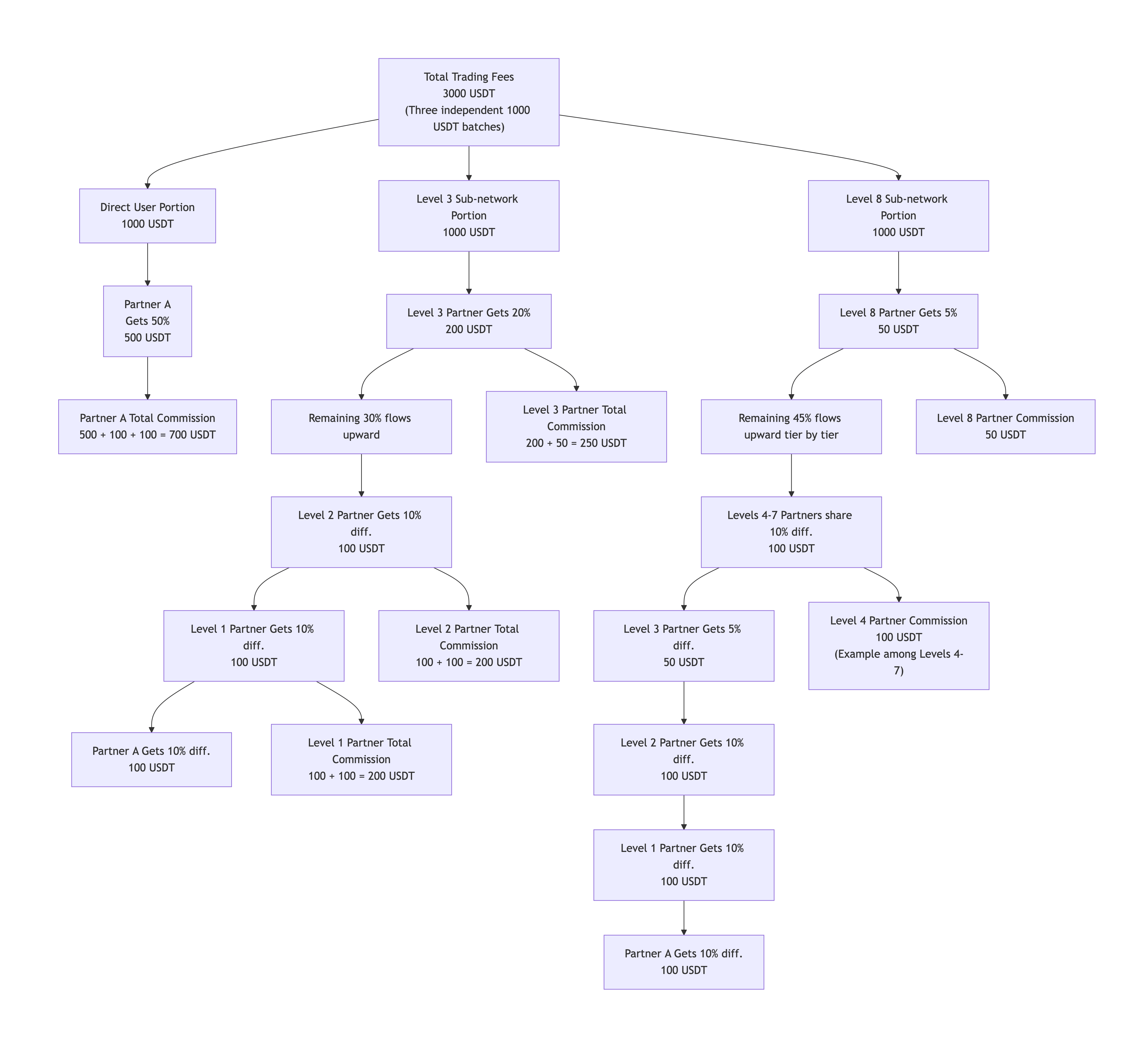
Key Takeaways:
-
Value of Network Effects: Even trades generated by the bottom-most Tier 8 affiliate can earn you, as the top layer, a commission (via tiered price differences). This greatly incentivizes expanding the depth of your network.
-
Rate Setting is Strategy: The commission rate you set for sub-affiliates directly determines your attractiveness and your own profit margin. This is an art of balance.
-
Transparent & Predictable Earnings: All calculations are based on public fee differences and trading data. Every bit of your earnings is traceable.
Part 3: Detailed Explanation of Core Operational Functions
1. Link & Promotion Management
2. Data Tracking & Fund Management
-
Real-Time Data: In the "Invite & Rewards" section, you can view registrations and real-time commissions generated by each link, and create personalized short links and QR codes.
-
Deposit & Withdrawal Tracking: In the "Deposit and Withdrawal" section, you can check detailed on-chain deposit and withdrawal records and statuses for all users within your network, achieving transparency of fund flows.
3. Account Security & Personalization Settings
-
You can view and update your personal profile and monitor all login history for the account (including device, location, IP, and time) to ensure security.
-
To change your bound email, phone number, or Google Authenticator, you need to go to your profile page on the CoinCatch website.
Part 4: Practical Guide & Best Practice Recommendations
1. Time Benchmark: All data and commission settlements within PMS are based on the UTC+8 time zone. Data resets to zero daily at 00:00. The daily commission calculation cycle is from 00:00 to 24:00, and payouts are made at 21:00 the following day.
2. Commission Currency: Commissions are settled in the native currency of the user's transaction. However, for unified measurement on the dashboard, all fees and commissions are converted to USDT using real-time exchange rates.
3. Launch Strategy:
-
Start with Direct Users: First, leverage your direct influence to develop your first batch of trading users, solidifying your base earnings.
-
Develop Core Sub-affiliates: Identify potential leaders from your community or network and attract them to become your Tier 1 sub-affiliates with competitive commission rates.
-
Utilize Two-Way Links Effectively: Prioritize using "Two-Way Commission Links" that offer direct discounts to users during promotions, as this can significantly increase conversion rates.
-
Data-Driven Optimization: Regularly analyze the performance of different links and sub-affiliates via the dashboard to adjust your resource allocation and commission strategy.
Conclusion
CoinCatch's PMS is more than just a backend tool; it is a complete business cooperation framework. It digitizes and automates complex distribution networks from traditional fields and provides clear value rebate for each node. Understanding and utilizing this system effectively, especially its multi-level commission mechanism, means you can transform your influence, social connections, and leadership abilities into a structurally stable, sustainably growing passive income channel.
The key to success lies in clearly understanding the rules (especially the commission calculation logic), strategically setting rates, and actively utilizing the various promotion and management tools provided by the system. Now that you have this map, it's time to start planning and building your own earnings network.